The File System Is the Collaboration
How I set up human–AI research partnerships — and the repo-to-collab skill that scaffolds them.
Part 1 of a series. Part 2: A Research Project is a Graph, Not a Document.
DeepDive by NotebookLM on this post
The Debate
There is a genuine divide in academia right now about AI and research integrity.
On one side: AI is corrosive to scholarship. It produces confident-sounding nonsense, homogenizes thinking, lets researchers outsource the intellectual work that makes research worth doing. Academic integrity depends on the researcher actually knowing their subject, actually struggling with the data, actually writing their own arguments. AI shortcuts all of that. Some journals have banned AI-generated text outright. Some departments are treating AI use the same way they treat plagiarism.
This is not an absurd position. The concerns are real.
On the other side: AI is a capability multiplier that research has always needed. Every major tool that changed how research is done — statistical software, computational notebooks, automated data pipelines — was initially resisted on similar grounds. Researchers who adopted them earlier produced more, moved faster, and asked bigger questions. AI is the next step in that progression.
I am firmly in the second camp. But I think the debate is often framed at the wrong level — as if the choice is between "use AI" and "don't use AI," when the real question is how to use it.
Consider what has happened at Anthropic itself. Software engineers there no longer write most of the code by hand — they plan, design, and review AI-generated code. The entire marketing function runs with one human employee coordinating AI agents. These are not cases of AI replacing human judgment. They are cases of human judgment operating at a different altitude: setting direction, evaluating output, making the calls that require genuine understanding — while AI handles the execution across a much larger surface area than any individual could cover alone.
Research can and should work the same way. The researcher still formulates the question, evaluates the identification strategy, interprets the coefficients, and takes responsibility for the claims. But the coding, the table formatting, the literature search, the prose drafting — all of this can be a joint effort, with both parties genuinely working on it, neither party owning it exclusively.
That is the model this skill is built to support: genuine co-authorship, where the human researcher and the AI both have their hands on everything — the thinking, the coding, the statistical analysis, the writing of findings — session after session, across the life of a project.
And it turns out that making this kind of collaboration work continuously depends almost entirely on one thing: the file system.
Everything Is a File
Unix/Linux has a foundational philosophy: everything is a file. Hardware, devices, network sockets, processes — all abstracted as files, readable and writable through a uniform interface. This simplicity is what makes the system composable.
The same philosophy, it turns out, is exactly what makes human–AI collaboration on research work.
A research project has many kinds of knowledge: the paper draft, the analysis code, the data, the literature. But it also has knowledge that usually lives nowhere — in the researcher's head, in their memory of last Tuesday's session, in the unwritten understanding of why the code is structured the way it is, what the current open questions are, what to try next. This tacit knowledge is exactly what gets lost between AI sessions. Every time you close Claude Code and reopen it, that knowledge evaporates.
The solution is to make it a file.
Not just the code and the writing, which already live in files. The researcher's working memory, the project's current status, the daily checklist, the collaboration rules, the session handoff — all of it, explicitly written in markdown, sitting in the repository alongside everything else. When both parties can read and write to the same file system, there is no knowledge that belongs exclusively to one side of the collaboration.
This is the architectural idea behind repo-to-collab: the file system is the collaboration medium. The markdown files are not documentation for later. They are the active interface through which the human researcher and the AI work together, right now, on the same project.
What This Looks Like in Practice
A research project set up for this kind of collaboration has a file structure that reflects not just the research artifacts, but the collaboration itself:
your-research-project/
├── CLAUDE.md                  ← shared project brain: facts, conventions, rules
├── literature/
│   └── CLAUDE.md              ← how to use this folder; citation key format
├── code/
│   └── CLAUDE.md              ← run order, coding rules, known data quirks
├── writeup/
│   └── CLAUDE.md              ← file map, compile commands, style rules
├── results/
│   └── CLAUDE.md              ← read-only; naming conventions; how to interpret
├── slides/
│   └── CLAUDE.md              ← source files; sync status with paper
└── .claude/
    ├── STATUS.md              ← living memory: phase, done, blockers, next tasks
    └── skills/
        ├── session-start/     ← load status at session open
        ├── wrap-session/      ← save progress before closing
        ├── lit-search/        ← search literature for citations
        ├── reg-table/         ← format regression output as LaTeX table
        └── git-commit/        ← write and execute meaningful commits
Every CLAUDE.md file is a contract between the human and the AI about how to work in that part of the project. Every entry in STATUS.md is a handoff note — what was done, what is in progress, what comes next. The slash commands encode the repeatable workflows that both parties follow.
None of this is opaque. Every file is plain markdown. The researcher reads it, edits it, commits it, and shares it. The AI reads the same files and works from them. There is one representation of the project state, and both parties have access to it.
The Daily Rhythm
The session workflow makes the collaboration concrete:
cd your-research-project
claude
/session-start     # reads STATUS.md; AI reports where the project stands
Here is what that actually looks like in practice:
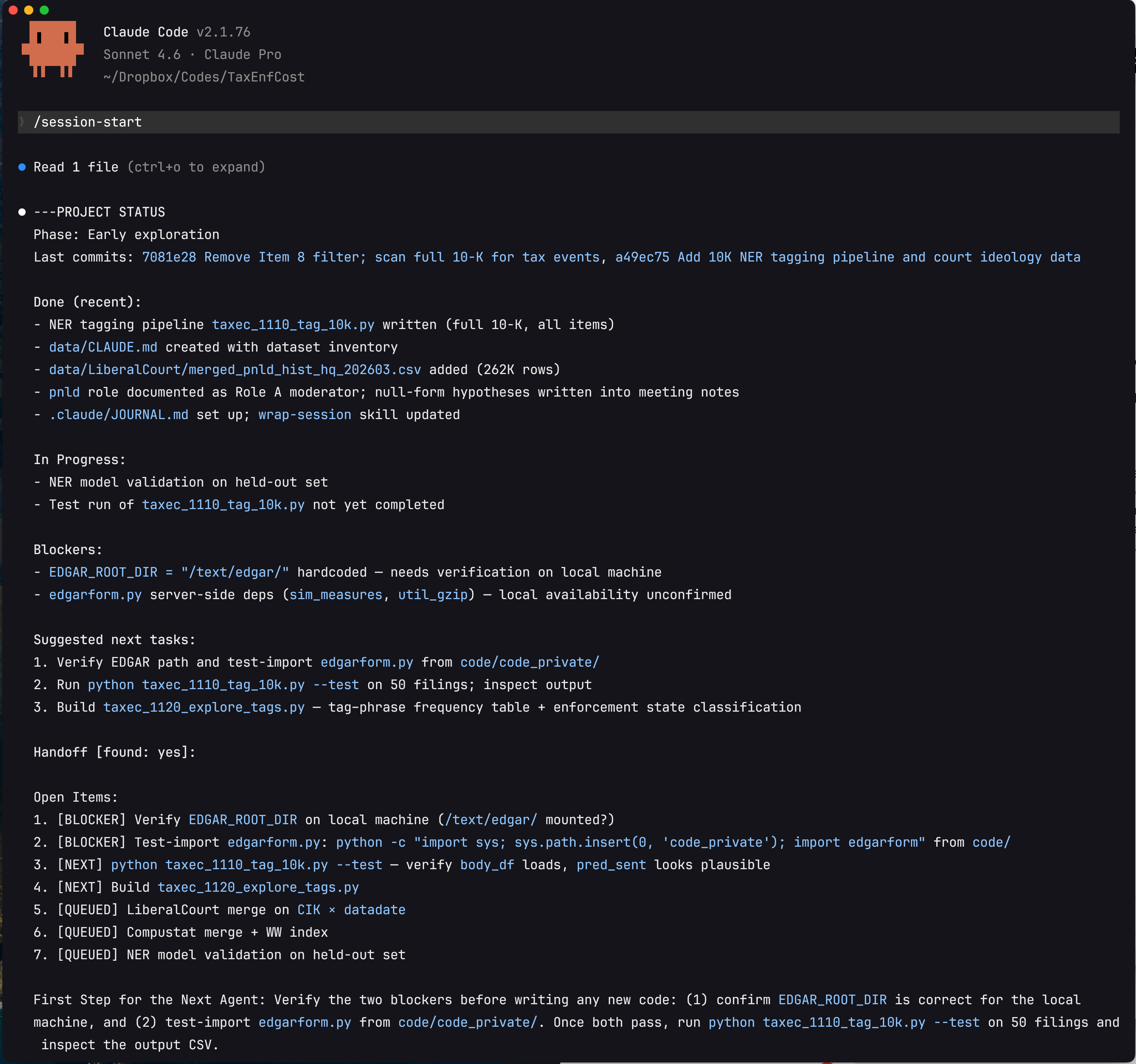
Several things are worth noting in this output. First, the status report includes not just what is done and in progress, but the two concrete blockers preventing forward progress — a hardcoded file path and an unconfirmed server dependency — flagged precisely enough that the next session can resolve them immediately without re-investigation. Second, the items are prioritized: [BLOCKER] before [NEXT] before [QUEUED]. Third, the final paragraph — "First Step for the Next Agent" — gives a single unambiguous starting action. This is the output of /handoff, which was run at the end of the previous session when context was running out. The new session picks up from this document rather than from a blank slate or a vague memory of where things stood.
This is the file system doing its job. Nothing in this status report lived in anyone's memory. It was written to .claude/260315-handoff.md by the previous session, committed to git, and read back by the new session in seconds. Both the human researcher and Claude see exactly the same state of the project.
From here, the session is genuinely joint. The researcher might ask Claude to debug why the entropy balancing isn't converging, then take over to think through the economic interpretation, then hand it back to Claude to format the results as a LaTeX table, then write the prose themselves, then ask Claude to check consistency between the table and the text. Neither party owns any of these tasks exclusively. Both contribute to all of them.
At the end of the session:
/wrap-session      # AI summarizes, updates STATUS.md, suggests next tasks
/git-commit        # AI reads the diff, writes a meaningful commit message
STATUS.md is overwritten with the current state. The next session starts from exactly where this one left off — not from the researcher's imperfect memory of what happened, but from a file.
What repo-to-collab Does
Setting up this collaboration structure by hand takes hours per project. repo-to-collab is a Claude Code skill that generates it automatically from your existing repo.
Four Phases
Phase 1 — Analysis. Before asking you anything, the skill maps your directory tree and infers your project type from file signatures: .tex and .bib for research writing, .py/.R/.sas for quantitative analysis, package.json for software. It detects what Claude infrastructure already exists and plans to extend rather than overwrite.
Phase 2 — Interview. The skill shows you a structured summary of what it found, then asks only what it genuinely can't infer: what the project is about (one or two sentences, for the CLAUDE.md header), what phase it's in, what to prioritize. For research projects, it also asks about target journal and statistical tools. Everything else — folder purposes, key files, run order — it reads from the structure.
Phase 3 — Generation. The skill creates the full collaboration scaffolding: root CLAUDE.md, subfolder CLAUDE.md files, .claude/STATUS.md, all five skills, and a .gitignore update. Each generated file is populated with project-specific content, not generic placeholders.
Phase 4 — Summary. A clean report of everything created, plus the exact commands to start your first collaboration session.
A Meta-Skill
Most Claude Code skills perform a task: search a folder, format a table, write a commit message. repo-to-collab is different in kind. It is a meta-skill — a skill whose primary output is other skills.
You install it once, globally. You run it once per project. When it finishes, it has generated a suite of smaller, project-specific skills inside that project's .claude/skills/ directory: /session-start, /wrap-session, /git-commit, and conditionally /lit-search, /reg-table, and /handoff depending on what your project contains. These child skills are not generic templates — they are customized to your actual folder names, file paths, and conventions during the generation phase.
The analogy in software is a scaffolding tool or a project generator: create-react-app, cookiecutter, rails new. You run the generator once; it produces the project structure; the generator itself is no longer in the loop. repo-to-collab works the same way, except the artifacts it generates are AI collaboration infrastructure rather than code boilerplate.
This distinction matters for how you think about the tool. repo-to-collab is not something you invoke repeatedly as part of your research workflow. The skills it spawns are. After the first run, repo-to-collab recedes into the background — the child skills take over, and they are what you interact with every day.
The Generated Files
Root CLAUDE.md — the shared project brain. Research question, identification strategy, data sources, sample filters, folder map, key variable definitions, coding conventions, writing conventions, collaboration rules. Both parties read this at the start of every session.
Subfolder CLAUDE.md files — folder-specific contracts. literature/CLAUDE.md specifies how to search for citations and verify cite keys. code/CLAUDE.md specifies run order, seed setting, output naming, and known data quirks. writeup/CLAUDE.md maps every .tex file, lists the compile command, and enforces journal style rules. results/CLAUDE.md marks the folder as read-only (outputs only, never edited directly) and explains how to interpret the regression output. These load lazily — only when Claude is working in that subfolder — so sessions stay lean.
.claude/STATUS.md — the living working memory. Updated by /wrap-session at the end of every session and read by /session-start at the beginning of the next. This file is the reason the collaboration doesn't restart from zero each time.
The ## What's Done section is structured as a milestone tree, not a flat checklist. The top-level milestones are fixed and abstract — identical across every academic research project regardless of field:
### 1. Research Design
### 2. Data & Measurement
### 3. Empirical Analysis
### 4. Manuscript
### 5. Dissemination
These five stages are universal enough that any researcher (or AI) can immediately read the status of an unfamiliar project without prior context. Within each milestone, concrete deliverables carry [x] / [ ] markers. Section 2 (Data & Measurement) is the most granular — it uses a third level of sub-headers for distinct data sources or pipelines, since data work is where the most complex, project-specific tasks live:
#### 2a. Primary Database (e.g., CRSP/Compustat merge)
- [x] Downloaded and unzipped raw files (1993–2023)
- [x] Applied CRSP share-code and exchange filters (shrcd 10/11, exchcd 1/2/3)
- [x] Constructed market equity at fiscal year end; merged with Compustat on gvkey × datadate
- [ ] Winsorize continuous variables at 1st/99th percentile by year
- [ ] Verify no duplicate firm-year observations after merge

#### 2b. Hand-Collected Event Data
- [x] Downloaded proxy filings (DEF 14A) for S&P 1500, 2010–2020
- [x] Parsed meeting dates and vote outcomes with regex pipeline
- [ ] Resolve 87 filings where vote totals don't sum to shares outstanding
- [ ] Cross-validate against ISS voting data for 2015 subsample

#### 2c. Text / NLP Measure
- [x] Downloaded 10-K Item 7 blocks via EDGAR full-text search API
- [x] Sentence-tokenized with pysbd; applied keyword filter (recall: 0.91, precision: 0.84)
- [ ] Fine-tune FinBERT classifier on 500 hand-labeled sentences
- [ ] Generate firm-year aggregate score; check correlation with analyst tone measures

#### 2d. Analyst / Market Data
- [ ] Pull I/B/E/S detail file; compute forecast dispersion and revision momentum
- [ ] Merge on PERMNO × fiscal quarter end (±3 day tolerance)
The remaining four dynamic sections at the bottom of STATUS.md rotate each session:
## Accomplished This Session   ← what was done today, and WHY (see below)
## Current Blockers            ← what is preventing forward progress
## Open Questions              ← unresolved methodological or data questions
## Next Session Tasks          ← ordered list of what to pick up next
Together, these four sections answer the five questions that working memory must keep alive across sessions:
| Question | Where it lives |
|---|---|
| What project are we on and what is the goal? | Root CLAUDE.md + §1 Research Design in the task tree |
| Where are we in the project lifecycle? | §1–§5 milestone fractions reported by /session-start |
| What did we do, and why did we do it? | ## Accomplished This Session (see format below) |
| What is blocking us right now? | ## Current Blockers |
| What do we tackle next? | ## Next Session Tasks |
The "why" question is the one most often lost. Standard changelogs record what was done; they rarely record why the decision was made. By the time the next session opens, the AI has no memory of the reasoning — and the researcher may not either. For example, knowing that "we added check_output_for_illegal_tags()" is less useful than knowing "we added check_output_for_illegal_tags() — prevents hallucinated Gemini tags from polluting training data." The second form lets any future agent (or co-author) instantly understand not just the code change but the problem it was solving.
The /wrap-session skill enforces this with a required bullet format:
## Accomplished This Session
- Added `check_output_for_illegal_tags()` — prevents hallucinated Gemini tags from polluting training data
- Hardened prompt template with `<BOUNDARY_RULES>` — reduces Gemini tag hallucination rate
- Removed Item 8 filter from 10-K pipeline — IRS disclosures appear in Items 1A, 3, 7, 8 too
Each bullet: - [what was done] — [why: one clause on the motivation or problem solved].
This structure means /session-start can report milestone progress as a simple fraction (§1: 6/6, §2: 5/12) rather than forcing the AI to interpret an undifferentiated bullet list. And /wrap-session has unambiguous instructions: preserve the tree, tick newly completed items, add new subtasks under the right milestone, never flatten, always capture the why.
Bundled skills:
/session-start— readsCLAUDE.md,STATUS.md, and the last five git commits; reports milestone progress as§1–§5fractions from the task tree; surfaces blockers and next tasks; asks what to work on/wrap-session— summarizes the session, overwritesSTATUS.mdpreserving the five-milestone tree (ticks completed items, adds new subtasks, never flattens), updates the four rotating sections (Accomplished / Blockers / Open Questions / Next Tasks), prompts a git commit; each accomplished-item bullet uses the format- [what] — [why]so future sessions know not just what changed but why the decision was made/git-commit— reads the diff, writes a meaningful commit message in imperative mood, executes after confirmation/lit-search— searchesliterature/markdown files for papers relevant to a topic or claim; returns cite keys, one-line summaries, and citation context/reg-table— takes a CSV of regression output and produces a publication-ready LaTeX booktabs table: three decimal places, t-statistics in parentheses, significance stars, fixed effects rows, variable definition notes
Why Files, Not Chat Memory
A natural question: why not use AI auto-memory (Claude's built-in ~/.claude/projects/ memory system) for all of this?
Auto-memory is written by the AI and lives outside the repo. It's invisible to the human, not version-controlled, not shareable with collaborators, and not readable without opening Claude Code. It's useful for personal preferences — how you like responses formatted, corrections you've given, workflow habits — but it's the wrong place for project facts.
The Linux philosophy applies here too: if it matters to the project, it should be a file in the project. Your current research phase, the open questions about clustering standard errors, the reminder that gvkey 12345 has a restatement in 2003 — these belong in the repo, committed to git, readable by any collaborator (human or AI), editable in any text editor. They should not be locked inside a memory system that only the AI can see.
The CLAUDE.md hierarchy and STATUS.md put all of this in the open. The collaboration state is transparent, auditable, and owned by no one party exclusively.
Installation
Via the Claude Code plugin system
# Register the marketplace (one-time)
claude plugin marketplace add reeyarn/skill_collection --sparse .claude-plugin repo-to-collab

# Install the skill globally
claude plugin install repo-to-collab@skill-collection
Future updates: claude plugin update repo-to-collab
Manual install
git clone --filter=blob:none --sparse https://github.com/reeyarn/skill_collection.git /tmp/skill_collection \
  && cd /tmp/skill_collection \
  && git sparse-checkout set repo-to-collab \
  && cp -r repo-to-collab ~/.claude/skills/ \
  && cd - && rm -rf /tmp/skill_collection
Usage
Open Claude Code in any project folder and invoke the skill:
Or just say "set up Claude Code for this project" — Claude will recognize the intent and load the skill automatically.
Who This Is For
The skill is designed primarily for academic researchers in accounting, finance, and empirical social science — the standard stack of archival data (Compustat, CRSP, hand-collected), Python/R/SAS/Stata, LaTeX manuscripts, and BibTeX literature. The /lit-search and /reg-table skills reflect this; so do the writing conventions baked into the generated CLAUDE.md templates.
But the underlying principle — make the collaboration state explicit in files — applies to any long-running project with multiple knowledge types: code, writing, literature, results, and the tacit understanding of where the project stands and what comes next.
The Broader Point
The file system has been the universal interface for human collaboration on technical work for fifty years. Version control, code review, documentation, issue tracking — all of it built on files. The insight behind repo-to-collab is that human–AI collaboration doesn't need a new interface. It needs the same one, extended to cover the parts of research that have always lived only in researchers' heads.
Write those parts down. Put them in the repo. Let both parties read and write them. That's the collaboration.
GitHub: https://github.com/reeyarn/skill_collection/tree/main/repo-to-collab
Built with Claude Code. Feedback and contributions welcome.